The kanban methodology is a way of managing work by making it visible on a board, limiting how much work is in progress and improving the flow step by step. It starts from the process a team already has, rather than replacing it.
This guide covers the kanban system's roots at Toyota, the Kanban Method used by knowledge-work teams, its principles and six practices, how kanban compares with agile and Scrum, and how to start.
Key takeaways
- Kanban started as a card-based pull system in Toyota's factories.
- In knowledge work, the Kanban Method uses a board, work-in-progress (WIP) limits and flow metrics.
- Kanban starts with what you do now and changes it gradually, with no new roles required.
- Kanban and Scrum are usually grouped as agile approaches. Kanban uses continuous flow instead of fixed sprints.
- Start with a simple board, add a WIP limit, then measure cycle time and throughput.
What is the kanban methodology?
Kanban is Japanese for signboard or card. The kanban methodology uses visual signals, usually cards on a board, to show each piece of work and its stage. A limit on how much work each stage can hold stops the team from starting more than it can finish.
The result is a pull system: new work starts only when there is capacity for it. Problems such as bottlenecks, blocked items and long waits show up on the board, where the team can deal with them. The kanban method page explains the board itself in detail.
The kanban system at Toyota
The kanban system began at Toyota as part of just in time production. Taiichi Ohno developed it in the late 1940s and 1950s, inspired by the way American supermarkets restocked shelves only as customers took goods.
On the factory floor, a kanban card travels with a container of parts. When a step uses the parts, the card goes back upstream as the signal to make or move more. The number of cards caps the inventory in the loop. The pull system page shows how these loops are sized.
The Kanban Method for knowledge work
In the 2000s, David J. Anderson and others adapted these ideas for software and office teams. His 2010 book Kanban: Successful Evolutionary Change for Your Technology Business set out what is now called the Kanban Method.
Here the cards are tasks, the board shows the team's workflow, and WIP limits replace the fixed number of factory cards. Later work, including Daniel Vacanti's writing on flow and The Kanban Guide, put more weight on flow metrics such as cycle time and throughput.
Kanban principles
The Kanban Method describes a small set of change management principles.
Principle 1
Start with what you do now
Map and visualize the current process before changing it.
Principle 2
Agree to pursue improvement through evolutionary change
Make small, steady changes rather than a big reorganization.
Principle 3
Encourage acts of leadership at all levels
Anyone can spot a problem and suggest a change.
The six kanban practices
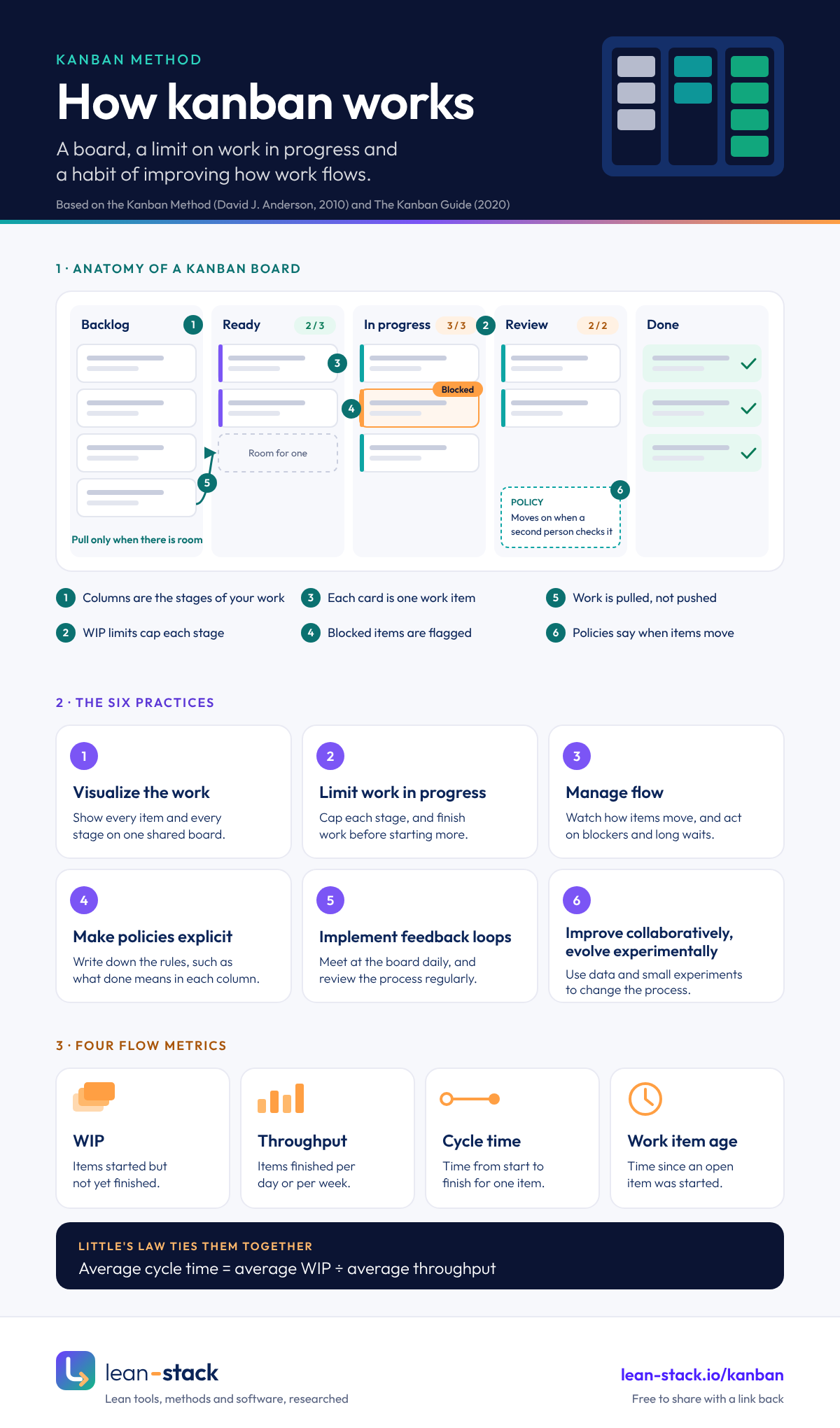
Embed this infographic
Free to use on your site, as long as the credit link stays in place.
Practice 1
Visualize the work
Put every item and every stage on a board, so the whole team sees the same picture.
Practice 2
Limit work in progress
Set a maximum for each stage, and finish work before pulling more.
Practice 3
Manage flow
Watch how items move, and act on blockers and long waits.
Practice 4
Make policies explicit
Write down the rules, such as what done means for each column.
Practice 5
Implement feedback loops
Hold short regular meetings, such as a daily stand-up at the board and a periodic review.
Practice 6
Improve collaboratively, evolve experimentally
Use data and small experiments to change the process.
Kanban vs agile and Scrum
Kanban is usually counted as one of several agile approaches, and The Kanban Guide defines it as a strategy for optimizing the flow of value that teams can apply to any existing process. Some practitioners see the Kanban Method as a change method in its own right rather than an agile framework. Either way, the practical comparison is kanban vs Scrum.
Scrum works in fixed sprints, usually two weeks, with set roles and a planned batch of work per sprint. Kanban has no sprints: work flows continuously, the board limits work in progress, and changes can enter the queue at any time.
Many teams combine them, keeping Scrum's events and adding a kanban board with WIP limits. Kanban often suits work that arrives unpredictably, such as support, operations and maintenance.
Kanban metrics
Cycle time is how long an item takes from start to finish. Throughput is how many items finish in a period, such as a day or a week. WIP is how many items are in progress. Little's Law ties them together: average cycle time equals average WIP divided by average throughput, as long as both use the same time unit and the system is roughly stable.
A cumulative flow diagram (CFD) plots how many items sit in each stage, day by day. The vertical gap between bands is WIP, which you read directly. The slope of the Done band is throughput, and the horizontal gap between bands is an approximate average time in process. Exact cycle times come from each item's start and finish dates. The Little's Law calculator and the flow metrics tools guide cover how to measure them.
Little's Law: a worked example
Here is an illustrative example, with made-up numbers, to show how the law helps a team decide where to act. A support team has 24 tickets in progress on an average day and closes 8 tickets a day. Average cycle time is 24 / 8 = 3 days.
Customers are told to expect an answer in two days. Little's Law says that with 8 tickets a day going out, the only way to an average of 2 days is to hold about 16 tickets in the whole system, queue included. Since roughly 8 new tickets arrive each day, that means closing more of them: about 12 a day while the backlog drains, then 8 a day to keep it there.
A WIP limit on its own does not do that. If the team caps work in progress at 16 and changes nothing else, 8 tickets simply move into a visible queue, and the customer still waits 3 days on average. What the limit does do is cut the time each ticket spends half done, and with it the switching between tickets. That is where the extra throughput usually comes from.
So the useful plan has two parts: a WIP limit to stop starting and start finishing, and a check after a few weeks on whether throughput has risen. If it has not, the team needs more capacity or less work per ticket. Sorting the queue also helps the customers who matter most: urgent tickets can go first even while the average is unchanged.
If the numbers do not behave as the law predicts, the system is probably not stable: work may be arriving faster than it leaves, or a few large tickets may be blocking the rest.
How to set WIP limits
There is no correct starting number. A common rule is to begin close to the current WIP in each column, then lower it a step at a time. Watch what happens after each change: if people sit idle, the limit is too low; if items still pile up and wait, it is too high.
Two other starting points work for many teams. One is a limit per person, such as one or two items each, which keeps everyone's own queue short. The other is a limit on the whole board rather than on each column, which is simpler for a small team.
Write the limit at the top of the column and treat a full column as a signal to help, not a rule to break. When a column is full, people swarm on the items already there, or on the blocker downstream that keeps them from moving.
Classes of service
Not every item carries the same cost of delay. Classes of service give the team agreed rules for different kinds of work, so they do not argue over priority at every stand-up.
Anderson's book describes four common classes. Expedite items, such as a production outage, jump the queue and may break the WIP limit, so allow at most one at a time. Fixed-date items, such as a regulatory deadline, start early enough to finish on time. Standard items flow first in, first out. Intangible items, such as clean-up work, have no urgent deadline but cost more the longer they wait.
Show the class on each card with a color or a separate lane. Track how often each class is used. If expedite items show up every day, the problem is upstream planning, not the board.
When kanban is a poor fit
Kanban suits work that flows in a steady stream of small, similar items. It fits less well when the work is one large piece with a fixed scope and deadline, such as building a single facility, where a project schedule shows dependencies better than a board.
It also struggles when the team cannot control what it starts. If every request must begin the moment it arrives, a WIP limit has nothing to act on. Fix the intake agreement first, then add the board.
Last, kanban does not create focus on its own. A team that wants a fixed goal every two weeks, with a review at the end, may find Scrum's sprints give it more rhythm. Many such teams keep a kanban board inside the sprint.
How to start a kanban board
Map the stages your work already goes through, and make a column for each. Start simple: To do, Doing and Done is enough on day one.
Put every current item on the board. Then set a WIP limit on the busiest column, a little below what is in it today, and agree that nobody starts new work while the column is full.
Meet at the board for a few minutes each day, starting from the right-hand column. After a few weeks, look at cycle times and the places work waits, and change one thing. The kanban board page covers the board itself, and board tools are compared in the kanban software guide.
Frequently asked questions
What are the 6 practices of kanban?
Who invented kanban?
What is the difference between kanban and Scrum?
What is a WIP limit?
Is kanban agile?
What does a kanban board look like?
Guides on this topic
- Free kanban software: options, limits and when to payFree kanban software options, from a whiteboard or spreadsheet to free app plans and open-source tools. See what each option limits and how to choose.Read the guide
- Kanban board template: 6 layouts with columns and WIP limitsA kanban board template gives you columns, WIP limits, swimlanes and card fields. Six layouts, drawn as boards, free to print as PDF or fill in Excel.Read the guide
- Kanban board examples: 15 boards from different settingsKanban board examples for factories, hospitals, offices, software, sales, support, portfolios, classrooms and homes, with columns, WIP limits and lessons.Read the guide
- Kanban project management: principles, practices and metricsKanban project management uses a visual board, WIP limits and flow metrics. Learn Anderson's principles and practices, and how kanban compares with Scrum.Read the guide
Sources
Books and papers show their publication year. Web pages show the month we last checked them.
- 1.Taiichi Ohno, Toyota Production System: Beyond Large-Scale Production (Productivity Press, 1988)
- 2.David J. Anderson, Kanban: Successful Evolutionary Change for Your Technology Business (Blue Hole Press, 2010)
- 3.John Coleman and Daniel Vacanti, The Kanban Guide (kanbanguides.org, May 2025 edition, checked October 2026)
- 4.John D. C. Little, A Proof for the Queuing Formula: L = λW (Operations Research 9(3), 1961)
- 5.Daniel S. Vacanti, Actionable Agile Metrics for Predictability (ActionableAgile Press, 2015)
- 6.Donald G. Reinertsen, The Principles of Product Development Flow (Celeritas Publishing, 2009)